
Most people who help look after a property should not be handed the whole of it. The groundskeeper does not need the tractor's price, whoever does your books does not need the tractor, and the pest control contractor needs their own bait stations and nothing else.
So each person gets a role and their own answer to five questions, set from their card and changed whenever you like.
Three roles
What somebody may do.
A role is not the whole answer. What somebody may see is the five questions below. An owner is never limited by them: an owner sees everything, always.
The five questions
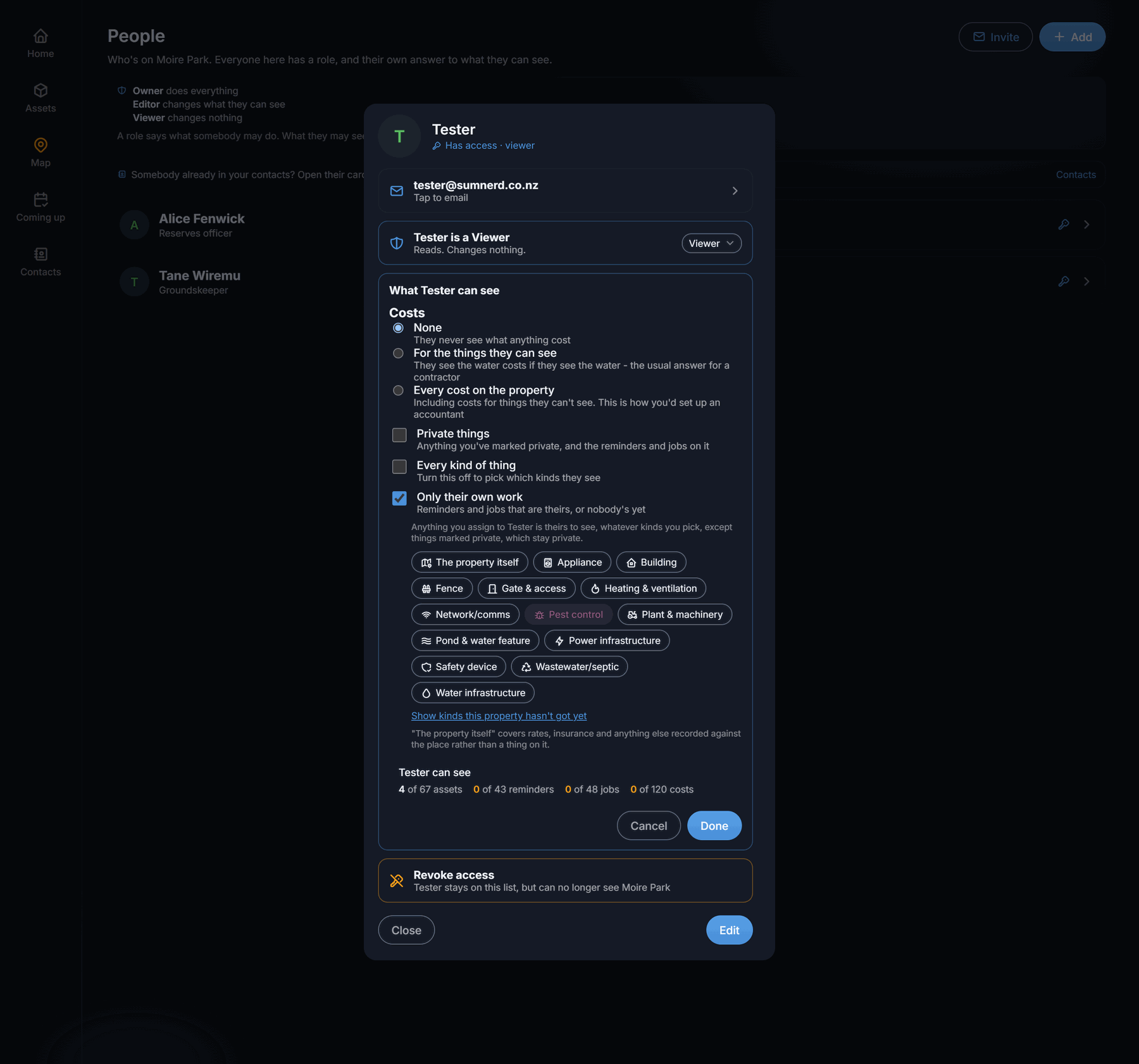
- What does it cost? Nothing, costs for the things they can see, or every cost on the property. Whoever does your books wants the third.
- Can they see private things? Anything marked private stays yours, with its reminders, jobs and costs.
- Which kinds of thing? Everything, or the ones you tick. A plumber sees the water and not your car.
- Everyone's work, or only their own? Their own means the jobs and reminders that are theirs, plus anything nobody has picked up.
- Can they see your contacts? The property's phone book, with the numbers and your notes about people. On for everybody unless you say otherwise. Somebody given access from their own contact card still sees their own name on the work you give them, and nothing else from the book.
Before you save, the screen says what they come to: “Sarah can see 3 of 20 assets, 3 of 15 reminders, 0 of 2 jobs, 0 of 8 costs”. The server works that out, not the app.
Four people, four answers
Not presets. Just what a role and five questions come to for the people who most often turn up.
That last row surprises people: whoever does your books can be given every cost on the property while being shown no assets at all. A ledger with costs missing looks complete and is not.
Somebody already in your contacts
Your plumber is probably already in the property's phone book. Open their card, choose Give access, and they are added to People and emailed. They stay in your contacts either way.
One rule tells the two lists apart. If they are paid to be there, they are a contact first. If they live there, they are a person. Somebody invited from a contact card is filed under Who works on it, which keeps them off the birthday list and out of the “whose is it” picker on your assets. It is decided when they accept. Revoking access never touches the contact.
It is not just the screen
Hiding a button is a courtesy. What protects your records is that the server checks every request and only ever sends a device the rows that account is allowed, so something you have not shared is not on their phone at all.
What it costs
Sharing is a Plotstead Plus feature: on a free account it is just you. Plus is $89 a year and allows up to 10 people on each property.
Being invited costs the person accepting nothing and never uses up their own free property. If a subscription lapses nothing is deleted: you keep full access to one property, the rest becomes read-only, and export stays available on every plan.
Questions
The app's help covers the same ground with the screens in front of you: contacts and people, and what each person can see. The privacy policy covers what we do with any of it. If you have an arrangement the five questions do not cover, tell us on the contact page.