Everything you know about your place, kept where it is.
Where the valve is. When the WOF is due. What the pump's model number is.
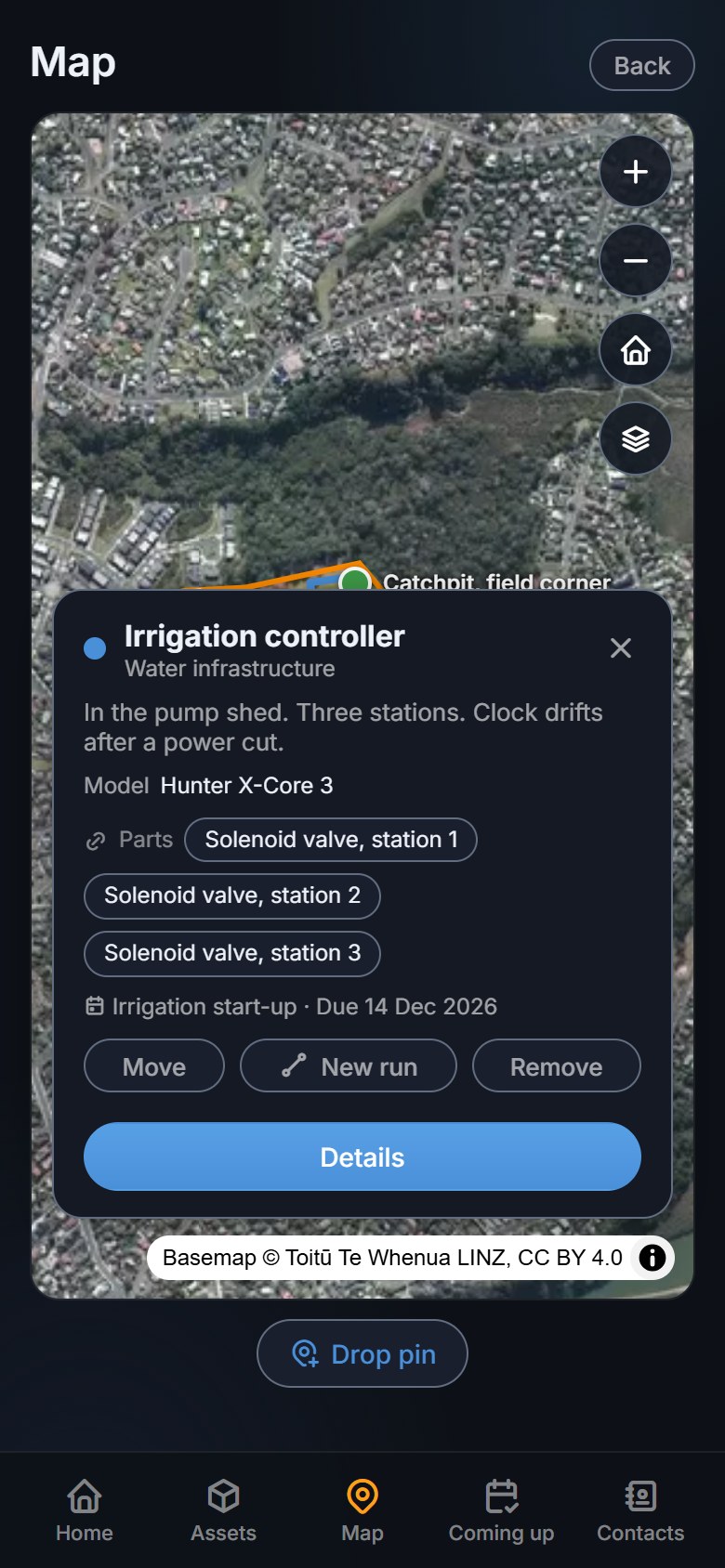
Plotstead puts each thing on your property onto an aerial photo of it,
with its photo, its manual, what it cost and when it is next due. For a
house, a rental, a bach, a farm or a lifestyle block in New Zealand.
The boundary arrives from LINZ onto aerial imagery of your own
place. Drop a pin on the pump, tap a line along the pipe, trace
a shape round the shed. Nothing has to go on the map, either.
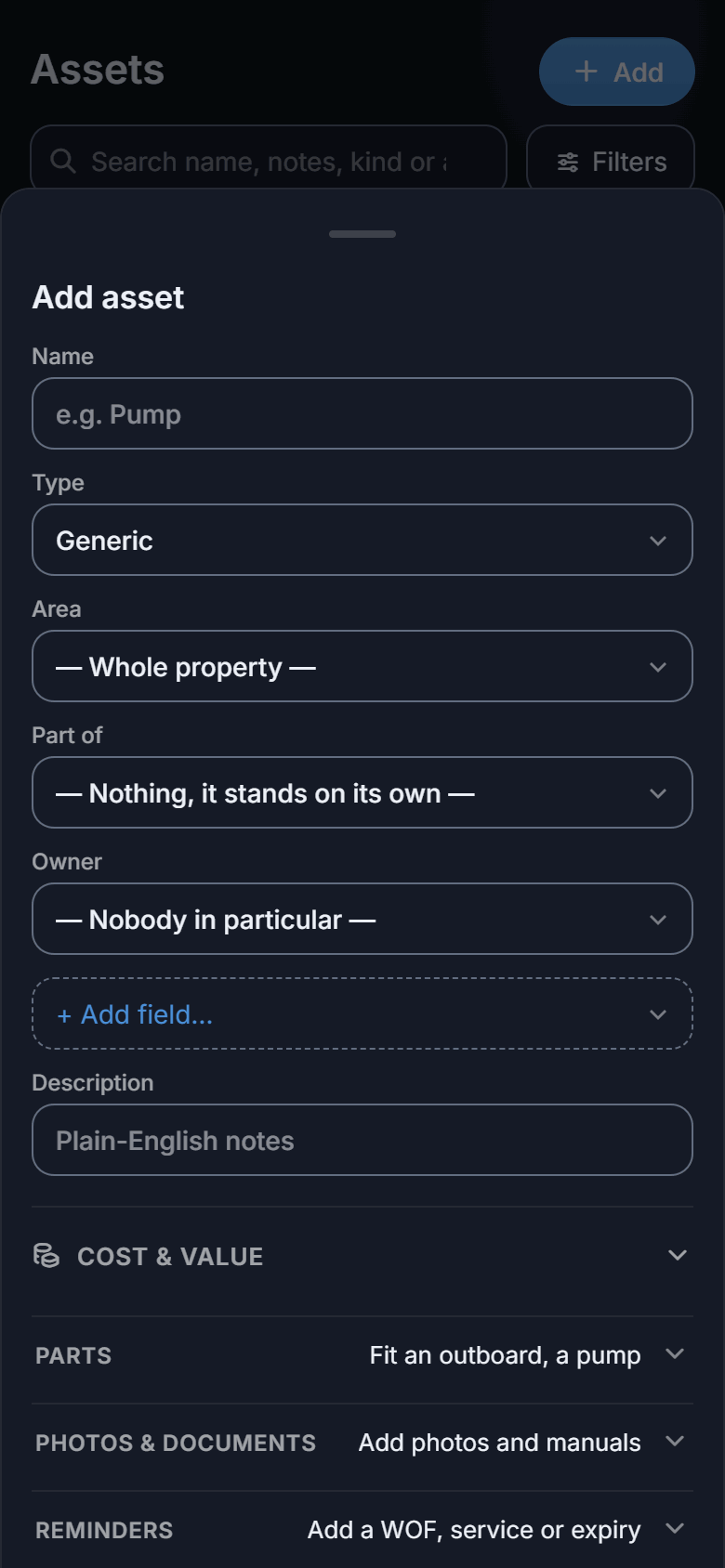
Add things as you come across them
Photograph the nameplate, attach the manual, put the invoice
against the thing it was for. Every record holds its own photos,
documents, notes and costs.
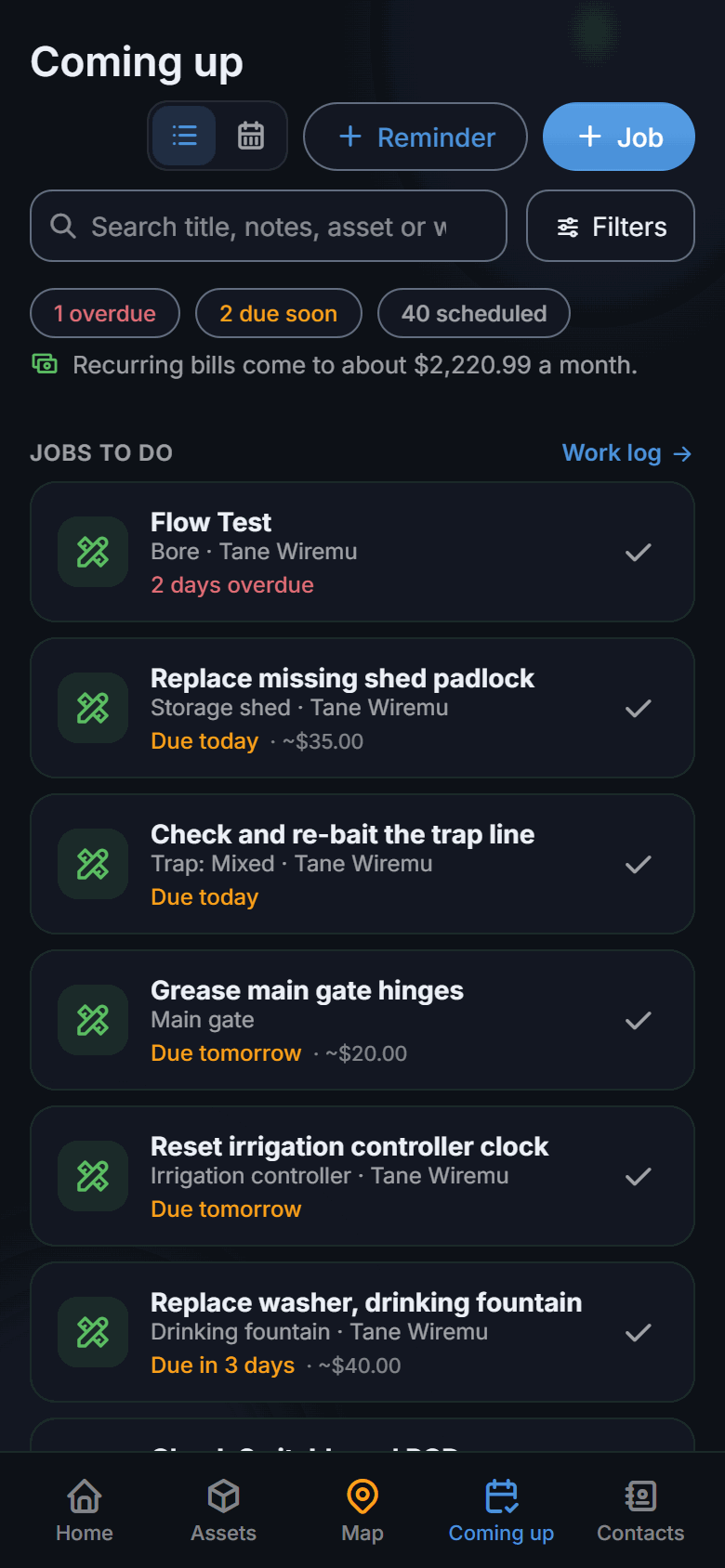
It reminds you, and adds it up
WOF, rego, insurance, rates, smoke alarms and servicing come up
when they are due. What each thing has cost you is there when
you ask, and the tax year exports already sorted.
Your whole place on an aerial photo: pins, pipe runs, boundaries
Works offline, out where there is no coverage
Photos, documents and serial numbers on every asset
Reminders for WOF, rego, insurance, rates and servicing
What each thing has cost you, and what it earns
A tax-year export, already sorted, for your accountant
Share the whole place with family, or part of it with a contractor
Every tradie you use, with the note about which one to ask for
Your data back out as CSV or GeoJSON, on any plan
Not quite like anything else
The closest anyone has come to describing it: a rich spreadsheet
built on top of an aerial photograph. Mapping software draws the
picture and expects you to learn GIS. An inventory app keeps the
list and has no map. Plotstead is the land, the assets on it, the
jobs done to them and the books, in one place.
Put your pipes, cables, gates, sheds and gear straight onto an
aerial photo of your place, instead of a spreadsheet. Drop a pin on
a single thing, tap out a line along a pipe run, or trace a shape
around a building or an area like the shed or the back paddock.
Draw it with a finger or a mouse, or walk or drive the route while
the app records and plots it for you, and reshape any of it later.
Type the address when you set up and the parcel arrives from
LINZ with its boundary on the map. Nothing to trace, and no GPS
unit involved.
Properties, broken down by asset
Every asset gets its own record: photos, documents, notes, the
fields its type suggests, and any of your own.
New Zealand compliance
Reminders for the dates you have to keep: WOF, rego, insurance,
rates, smoke alarm tests, septic pump-outs and the three-yearly
pool barrier inspection. The New Zealand rules are built in,
including the end of six-monthly WOFs in November 2026.
Work, before and after
A job is what needs doing, and afterwards it is what was done:
who, when, and what it came to. Set one to repeat and ticking it
off writes the next, on the same cycle, so the fortnightly round
keeps itself.
What everything costs
Log a repair against the thing that needed it, with the invoice
number and who did the work. Then ask what that asset has cost
you since the day you got it.
The vet, the plumber, the well driller, the sparky. Their number,
what they do, and the note that actually helps: ask for Dave, he
knows where the septic runs. Tap to call, and the work you file
against them remembers who did it.
Works offline
The apps work without an internet connection, and catch up the
moment you are back in range.
A vehicle from its plate
Enter the rego and Plotstead fills in the make, model and year,
and when the WOF and the rego run out. Those two become
reminders without you reading a windscreen.
See the month ahead
What is coming up as a calendar as well as a list, so you can see
what lands in the same week. Or subscribe to it from your phone's
own calendar, alongside everything else.
Have a rental or an Airbnb?
Money comes in as well as out. Rent goes in the ledger the same way
a repair does, as a one-off or set to repeat, and the totals show
what came in beside what went out.
Mark the cottage as earning income and everything fitted to it
follows, so the oven and the heat pump are sorted without tagging
them one at a time. At the end of the New Zealand tax year, export
it already split into what earns, what needs apportioning and what
is private, as a PDF or a spreadsheet for your accountant.
The compliance dates come with it. Smoke alarm tests and their
ten-year replacement, your Healthy Homes obligations, the septic
pump-out, the pool barrier inspection, all in the same list of
reminders as the WOF and the rates.
And the alarms come out as a document. Narrow the register to the
safety devices and export: every alarm on the place, what kind it is,
which room it is in, when it went in and when the battery runs out.
That is what you want in front of you at the start of a tenancy, and
it is the same two taps as everything else.
What it looks like
Real screens from the app, not mock-ups. Swipe, or use the arrows.
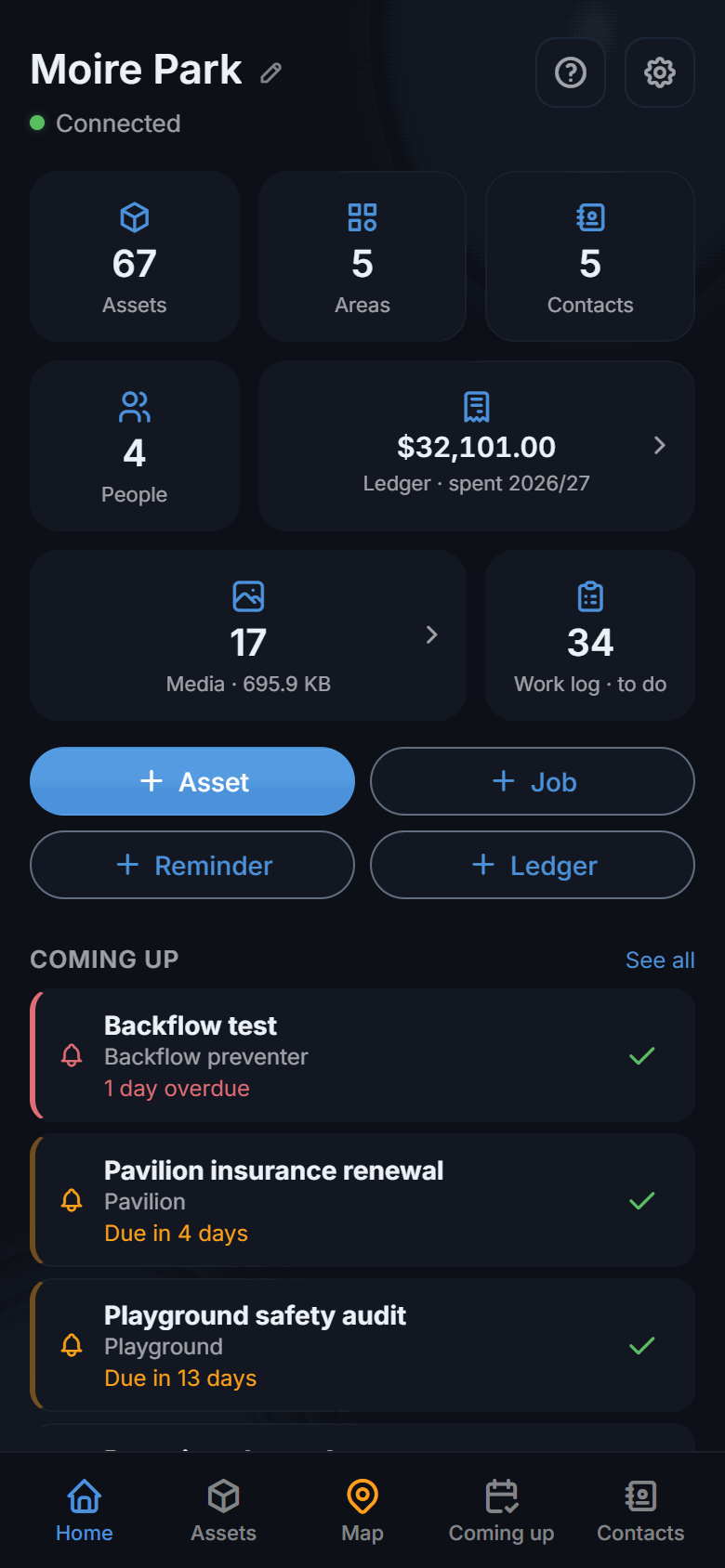
Everything on the place, where it actually isEvery asset on the place, parts and allOne thing, with everything known about itWhat is overdue, and what is comingOr as a month, to see what lands in the same weekA year of costs, against the things they were spent onWho did what, when, and what they chargedEverything still to do, and when it was last doneThe numbers you actually ringThe whole place at a glance
That map is a real one, of a public park, with sample data put on it.
We can't show you somebody's actual property: a map like this says where
the water shuts off and which gate is unlocked, which is exactly why it's
worth having and exactly why it isn't ours to publish. Yours looks like
this with your own place underneath, from the first boundary you draw.
One property, the whole map and every reminder. No credit card,
and no trial to run out.
1 property · just you · 100 MB of photos and files
Plotstead Plus
$89a year, or $8 a month
More properties, shared with family and whoever helps look after
the place. Every document: a brief to hand whoever is doing the
job, a dated register for your insurer, and the tax-year report
for your accountant. Recent satellite imagery, and room for the
manuals and photos.
Export everything on either plan. A lapsed subscription never locks you
out of your own records.
Questions people ask
What is Plotstead?
Plotstead is property and asset management software for New
Zealand. It puts your land, buildings, vehicles and the
infrastructure underneath, the pipes, cables, bores and septic
tanks, onto an aerial photo of your own place, and keeps the
manuals, photos, costs and maintenance history attached to each
one.
It then reminds you what falls due: WOF, rego, insurance,
rates, smoke alarms, septic pump-outs. It works with no signal
and syncs when you are back in coverage, which matters because
the things worth recording are usually the furthest from a cell
tower.
It is built for lifestyle blocks, farms, rural properties,
ordinary sections and rentals.
What people use it for.
I already use a spreadsheet. Why would I change?
Underneath it is the same idea, already wired up. Assets are one
sheet, reminders another, costs another, contacts another, and
they are joined to each other rather than copied between. A
repair knows which pump it was on, which invoice paid for it and
who did the work, without you keeping three tabs in step by
hand. And you can pull a spreadsheet back out whenever you want.
Can I track a rental or an Airbnb?
Yes. Rent goes in as a credit, one-off or set to repeat, beside
what the place costs to run. Mark the cottage as earning income
and everything fitted to it follows, then the tax year exports
already split into what earns, what needs apportioning and what
is private.
Can I let a contractor in without showing them everything?
Yes, and that is the point of it. Everyone you share with gets their
own answer to five questions: what they can see of the money, whether
private things are shared with them, which kinds of thing they see at
all, whether they see everyone's work or only their own, and whether
they see your contacts.
So the groundskeeper can have the run of the place without the
finances, the plumber can see the water and not your car, and an
accountant can be given every cost on the property while being shown
no assets at all. Who sees what.
Is it complicated to set up?
Type your address and the boundary arrives from LINZ, which is
most of it. After that you add things as you come across them:
photograph the nameplate on the pump, attach the invoice when it
turns up, put a date on the WOF while you are thinking about it.
Nothing is required. A half-filled record is worth more than a
perfect one you never made, so the forms suggest and never
insist.
Can I get my data back out?
Yes, on every plan including the free one, and that will not
change. Export any tax year or the whole lot as a spreadsheet
that opens straight in Excel. Letting a subscription lapse
leaves your records readable and exportable.
How does putting things on the map work?
There is a crosshair fixed in the middle of the screen and that
is where your point lands. Move the map under it until it sits
on the spot, then press the button. It is the other way round
from most maps, and the reason is your finger: at most zoom
levels a fingertip covers several metres of paddock and hides
the very thing you are aiming at.
One point is a pin, which is a pump or a gate. Keep adding
points and it becomes a run, which is how a pipe, a cable or a
fence goes in, and the map counts the length as you draw. Close
it up and it is a shape, and the map switches to telling you the
area instead. Out on the block you can walk a line with GPS
rather than tapping corners.
No. The boundary comes from LINZ on its own, and a thing does
not need a place on the map to be worth recording. Plenty of
people run a car, its WOF, its rego and its insurance without
putting a single pin down.
How does offline work?
The app keeps a full copy of your property on the device, so out
the back of the block with no signal at all you can still drop a
pin, put a date on a reminder, log what the part cost, and read
every note and serial number you have saved. It goes up on its
own next time you are in coverage. That is rather the point: a
bore pump is usually the furthest thing on the place from a cell
tower.
Photos are the exception. They need a connection to upload, so
the app says so and keeps the picture on your phone until you
have one. The browser version needs a connection throughout,
since it reads from the server as it goes. The Android app is on
Google Play, in open
testing.

 Type your address
 Add things as you come across them
 It reminds you, and adds it up


